|
|




Organize and Launch Shortcuts with Application Launcher
Launcher is an easy-to-use file and application shortcut manager that can launch all kinds of files and programs.
Drag-and-drop operations are supported when editing items shown in the Launcher
open and launch menu in system tray.
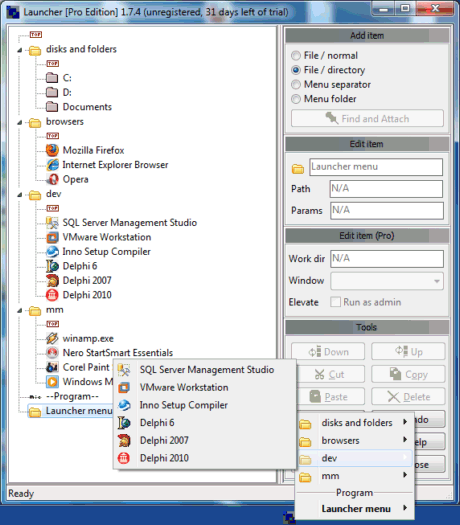
It is possible to create shortcuts by dragging files from e.g. Windows Desktop and Windows File Explorer followed by dropping them into the Launcher Manage Items window: Here you can configure Launcher shortcuts and Launcher tray menu. It is possible to create an unlimited amount of user defined sub-folders and item shortcuts to documents and applications. Launcher allows you to easily create shortcuts and configure launch options:
It is possible to create shortcuts by dragging files from e.g. Windows Desktop and Windows File Explorer followed by dropping them into the Launcher Manage Items window: Here you can configure Launcher shortcuts and Launcher tray menu. It is possible to create an unlimited amount of user defined sub-folders and item shortcuts to documents and applications. Launcher allows you to easily create shortcuts and configure launch options:
- Free: Supply command line parameters in application shortcuts.
- Free: Configure as a portable launcher running on USB sticks and drives.
- Free: Batch files and other executables support same options as applications.
- Pro: File or program window state, e.g. maxmized.
- Pro: Program start in directory / current work directory.
- Pro: Launch programs with Windows run as administrator elevation dialog.
- Pro: Launch all shortcuts in a menu folder with a single click. (Either all-at-once or wait-for-each.)
- Pro: Launch all shortcuts in menu folder upon Launcher software startup.
Get Launcher Now
You can purchase through a variety of payment methods. We also have a 30 days satisfaction guarantee to make your purchase risk-free.
Alternatively, you can also get started simply by downloading the fully functional 30 days trial.
Note: When the trial expires Launcher will switch to its free mode which contains the same features as the old freeware version of Launcher. If you have questions or feature requests for any edition of our file launcher software, please write us.
Alternatively, you can also get started simply by downloading the fully functional 30 days trial.
Note: When the trial expires Launcher will switch to its free mode which contains the same features as the old freeware version of Launcher. If you have questions or feature requests for any edition of our file launcher software, please write us.


