|
|


Recrawl and Resume Crawl in Website Download
Some webservers are sluggish or denie access to unknown crawlers like A1 Website Download. To ensure everything gets crawled, you can use "resume" functionality in website download tool.
Resume Scan to Fix URLs with Error Response Codes
There can be many reasons to resume a website scan after it stopped.
One being webservers can overload and respond with error codes for URLs, typically
An easy way to determine if any errors are left throughout entire website is to view directory summary for the root directory / domain.
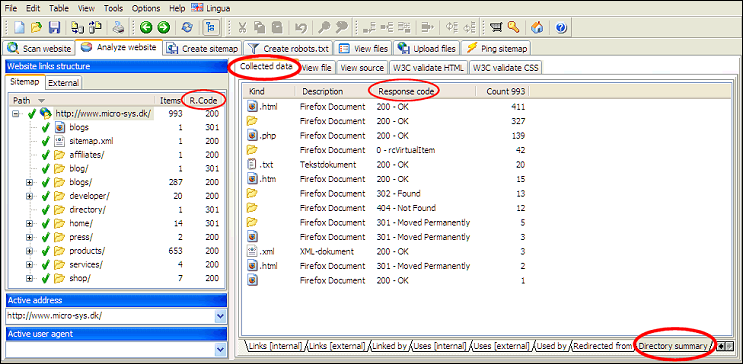
Then use the resume functionality in A1 Website Download to recrawl these URLs. Continue to do so until no errors are left.

While the website scan is running you can at any time:
How to use website scan and crawl resume functionality:
- 503 : Service Temporarily Unavailable
- 500 : Internal Server Error
- -4 : CommError
An easy way to determine if any errors are left throughout entire website is to view directory summary for the root directory / domain.
Then use the resume functionality in A1 Website Download to recrawl these URLs. Continue to do so until no errors are left.
While the website scan is running you can at any time:
- Pause and stop the website scan.
- Resume and continue your website scan.
How to use website scan and crawl resume functionality:
- To pause a scan is the same as to stop a scan. If scan is stopped/paused or internet disconnects, you can resume.
- To resume a scan you need to check the Resume option. (In old versions this was a push button.) Then click Start scan button.
- You can save the project. This enables you to load the project at a later time. Then you can resume the project.
Why Pausing Website Crawls Sometimes Remove URLs
You can force recrawl of certain URLs by changing their state flags in Website analysis before resuming website scan.
Depending on the program and version, the default behavior after a website scan finishes for whatever reason, e.g. being paused, is that all URLs that are excluded by webmaster filters such as robots.txt file and output filters are removed.
Above behavior is not always wanted since it means website crawler will spend time rediscover URLs it has tested before. To solve:
When filtered/excluded URLs are not removed in the website scan results, you can view their Crawler and URL state flags:

Depending on the program and version, the default behavior after a website scan finishes for whatever reason, e.g. being paused, is that all URLs that are excluded by webmaster filters such as robots.txt file and output filters are removed.
Above behavior is not always wanted since it means website crawler will spend time rediscover URLs it has tested before. To solve:
- Older versions:
- Uncheck Scan website | Crawler options | Apply "webmaster" and "output" filters after website scan stops
- Newer versions:
- Uncheck Scan website | Output filters | After website scan stops: Remove URLs excluded
- Uncheck Scan website | Webmaster filters | After website scan stops: Remove URLs with noindex/disallow
When filtered/excluded URLs are not removed in the website scan results, you can view their Crawler and URL state flags:
Resume Website Scan Analyzes URLs Again
The way the website crawl works internally, we have:
This means that all pages where all links have not been resolved will need to be analyzed again when resuming scan. To avoid this problem the website crawler can use HEAD requests to quickly resolve links to verified URLs. While this causes some extra requests during crawl to server (albeit all light), it will minimize waste to almost zero when using resume functionality.
To configure this, disable: Scan website > Crawler engine > Default to GET for page requests
- Found URLs: These are URLs that have been resolved and tested.
- Analyzed content URLs: The content of these URLs (pages) have been analyzed.
- Analyzed references URLs: The links found in content of these URLs (pages) have been resolved.
This means that all pages where all links have not been resolved will need to be analyzed again when resuming scan. To avoid this problem the website crawler can use HEAD requests to quickly resolve links to verified URLs. While this causes some extra requests during crawl to server (albeit all light), it will minimize waste to almost zero when using resume functionality.
To configure this, disable: Scan website > Crawler engine > Default to GET for page requests
Force Recrawl of Certain URLs
If you do not want to recrawl the entire website,
but Resume is not applicable because all URLs have been analyzed,
you can do the following:
- At the left side where all URLs are listed, select those you want to have crawled again.
- In Crawler State Flags uncheck all the Analysis xxx flags except Analysis required.
- Click the Save button in the Crawler State Flags area.
- In Scan website check Resume (full).
- Start the scan.
Find More URLs in Website Scans
If you have trouble getting all URLs included in website crawls, it is important to
first follow above recommendation. The reason is that URLs with error response codes are
not crawled for links. By solving that problem, you will usually also end up with more URLs.
You can find more suggestions and tips in our website crawl help article.
You can find more suggestions and tips in our website crawl help article.
Resume Full Versus Resume Fix Errors Versus Recrawl
- Resume (full):
- Keeps all URLs from earlier scan.
- Will crawl and analyze all URLs that are not flagged as fully analyzed.
- If any new URLs are found, these will be crawled as well.
- Resume (fix errors):
- Keeps all URLs from earlier scan.
- Will test all URLs that somehow error responded during crawl.
- Recrawl (full) - also called Refresh:
- Keeps all URLs from earlier scan.
- Will crawl and analyze all URLs. This includes URLs that do not include analysis required in their crawl state flags.
In the future, it is possible that the recrawl will prioritize URLs based on e.g. importance, when last checked, how often page changes etc. - If any new URLs are found, these will be crawled as well.
- Useful in cases where you have locked
content, e.g. page title for a specific URL, and want to make sure the locked data is kept.
Use the Lock buttons found next to different data such as titles.
- Recrawl (listed only):
- Like Recrawl, but will not analyze or include any new URLs in scan results.
- None of the above options checked:
- The default and recommended in most cases.
Note: When using any of this functionality remember to have the following option checked for the initial and all subsequent website downloads:
Scan website | Download options | Prioritize to keep downloaded URL file names on disk persistent across multiple downloads.
This option affects how the software deals with URLs that potentially collide when converted to disk file names:
- When unchecked: A counter value is added to the generated file name.
- When checked: A calculated hash value is added to the generated file name.
- When checked: URLs are now persistently mapped to the same disk file names across multiple crawls / downloads.
- When checked: Keeping as much of the original URL as possible in disk file names is prioritized.