|
|


See Website Crawl Progress in Website Download
Explanation about progress status information during website crawl in A1 Website Download.
Understand Website Scan Progress Information

The website crawler keeps total counts for following states:
- Internal "sitemap" URLs:
- Listed found:
Unique URLs located.
- Listed deduced:
Appears after website scan has finished: Assume crawler during scan found links to "example/somepage.html", but none to "example/". The latter is then "deduced" to exist.
- Analyzed content:
Unique URLs with content analyzed.
- Analyzed references:
Unique URLs with content analyzed and have all their links in content resolved (e.g. links to URLs that redirects).
- Listed found:
- External URLs:
- Listed found:
Unique URLs located.
- Listed found:
- Jobs waiting in crawler engine:
- "Init" found link:
Links found waiting to be analyzed. (All links are URL-decoded/URL-encoded, checked against all root path aliases, session variables cutout etc. After all "normalization" is done, the link is checked against a list of already known URLs. At minimum, various "linked-from" data is then updated.)
- "Analyze" found URL:
Page content in unique URLs waiting to be analyzed. (Content may have been retrieved already depending on settings.)
- "Init" found link:
- Jobs done in crawler engine:
- "Init" found link:
- "Analyze" found URL:
- "Init" found link:
Jobs Waiting in Crawler Engine
Per default, the crawler engine in A1 Website Download defaults to use GET requests when it hits a page URL for the first time.
This makes the crawler prioritize "analyzing" pages quickly afterwards since GET requests return
all page content into memory. This can sometimes mean the "init link"
queue grows very large since it is only done when no other "analysis" jobs are waiting.
If, on the other hand, the crawler uses HEAD requests when first testing an URL, much less data is transferred since all is done through HTTP headers. (This in turn also has the effect that all new detected links are quickly recognized as already tested. Thus the queue never grows big.) The downside to using HEAD requests, however, is that some servers respond buggy to HEAD requests. (And of course, if/when page analysis is later necessary, a GET request will be necessary to retrieve the page content.)
You can change above behavior by checking/unchecking option: Scan website | Crawler engine | Default to GET for page requests
If, on the other hand, the crawler uses HEAD requests when first testing an URL, much less data is transferred since all is done through HTTP headers. (This in turn also has the effect that all new detected links are quickly recognized as already tested. Thus the queue never grows big.) The downside to using HEAD requests, however, is that some servers respond buggy to HEAD requests. (And of course, if/when page analysis is later necessary, a GET request will be necessary to retrieve the page content.)
You can change above behavior by checking/unchecking option: Scan website | Crawler engine | Default to GET for page requests
Progress Changes When Website Scan Finishes
After the website scan finishes, you can have A1 Website Download remove unwanted URLs afterwards. This behavior is controlled by:
- Older versions:
- Scan website | Crawler options | Apply "webmaster" and "output" filters after website scan stops
- Newer versions:
- Scan website | Output filters | After website scan stops: Remove URLs excluded
- Scan website | Webmaster filters | After website scan stops: Remove URLs with noindex/disallow
Difference Between "Listed Found" and "Analyzed"
Progress difference is much like the difference between output filters
and analysis filters: Imagine you wanted to list
.pdf files but not have them analyzed/crawled. In such and similar cases you would see a difference between the two numbers in progress.
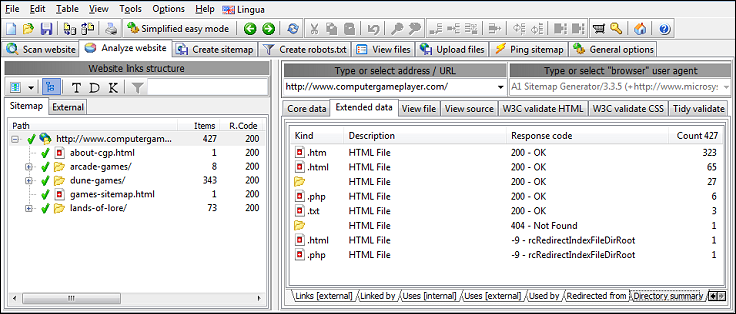
Detailed Counts of URLs After Website Scan
If you want to see detailed counts, you can do so after website scan has finished.
Just open the Analyze website tab that shows website scan results,
select the root URL and select
Extended data | Directory summary.
Log and Analyze Website Crawling Issues
If you experience strange problems spidering your website,
you can try enable Scan website - Data collection - Logging of progress.
After website scan, you can find a log file in the program data directory logs/misc.

The log file can be useful in solving problems related to crawler filters, robots.txt, no-follow links etc. You can find out through which page the crawler first found a specific website section.
The log file can be useful in solving problems related to crawler filters, robots.txt, no-follow links etc. You can find out through which page the crawler first found a specific website section.
|
2007-07-28 10:56:14 CodeArea: InitLink:Begin ReferencedFromLink: http://www.example.com/website/ LinkToCheck: http://www.example.com/website/scan.html |