|
|


Website Robots.txt, Noindex, Nofollow and Canonical
A1 Website Analyzer has optional support for obeying robots text file, noindex and nofollow in meta tags, and nofollow in link tags.
Note: We have video tutorials:

Even though these video demonstrations use TechSEO360 they are also applicable for users of A1 Website Analyzer.
Even though these video demonstrations use TechSEO360 they are also applicable for users of A1 Website Analyzer.
Website Analyzer and Webmaster Crawl Filters
The website crawler in A1 Website Analyzer
has many tools and options to ensure it can scan complex websites. Some of these include
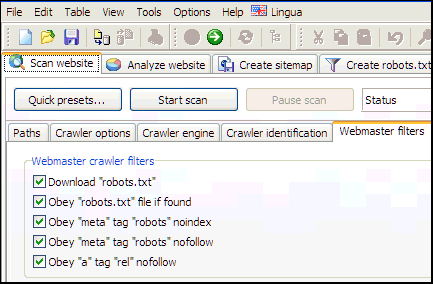
complete support for robots text file, noindex and nofollow in meta tags, and nofollow in link tags.
Tip: Downloading robots.txt will often make webservers and analytics software identify you as a website crawler robot.
You can find mose of these options in Scan website | Webmaster filters.
In connection with these, you can also control how they get applied:
If you use pause and resume crawler functionality you can avoid having the same URLs repeatedly crawled by keeping them all between scans.
Tip: Downloading robots.txt will often make webservers and analytics software identify you as a website crawler robot.
You can find mose of these options in Scan website | Webmaster filters.
In connection with these, you can also control how they get applied:
- Disable Scan website | Webmaster filters | After website scan stops: Remove URLs with noindex/disallow.
If you use pause and resume crawler functionality you can avoid having the same URLs repeatedly crawled by keeping them all between scans.
HTML Code for Canonical, NoIndex, NoFollow and More
- Canonical:
<link rel="canonical" href="http://www.example.com/list.php?sort=az" />
This is useful in cases where two different URLs give same content. Consider reading about duplicate URLs as there may be better solutions than using canonical instructions, e.g. redirects. Support for this is controlled by option: Scan website | Webmaster filters | Obey "link" tag "rel" canonical.
- NoFollow:
<a href="http://www.example.com/" rel="nofollow">bad link</a> and <meta name="robots" content="nofollow" />
Support for this is controlled by options: Scan website | Webmaster filters | Obey "a" tag "rel" nofollow and Scan website | Webmaster filters | Obey "meta" tag "robots" nofollow.
- NoIndex:
<meta name="robots" content="noindex" />
Support for this is controlled by options: Scan website | Webmaster filters | Obey "meta" tag "robots" noindex.
- Meta redirect:
<meta http-equiv="refresh" content="0;url=https://example.com" />
Support for this is controlled by option: Scan website | Crawler options | Consider 0 second meta refresh for redirect.
- Javascript links and references:
<button onclick="myLinkClick()">example</button>
Support for this is controlled by options:- Scan website | Crawler options | Try search inside Javascript.
- Scan website | Crawler options | Try search inside JSON.
Tip: You can in addition also choose an AJAX capable crawler in Scan website | Crawler engine.
Include and Exclude List and Analysis Filters
You can read more in our online help for A1 Website Analyzer to learn about
analysis
and
output
filters.
Match Behavior and Wildcards Support in Robots.txt
The match behavior in the website crawler used by A1 Website Analyzer is similar to that of most search engines.
Support for wildcard symbols in robots.txt file:
The crawler in our website analyzer tool will obey the following user agent IDs in the robots.txt file:
All found disallow instructions in robots.txt are internally converted into both analysis and output filters in A1 Website Analyzer.
Support for wildcard symbols in robots.txt file:
-
Standard: Match from beginning to length of filter.
gre will match: greyfox, greenfox and green/fox. -
Wildcard *: Match any character until another match becomes possible.
gr*fox will match: greyfox, grayfox, growl-fox and green/fox.
Tip: Wildcards filters in robots.txt are often incorrectly configured and a source of crawling problems.
The crawler in our website analyzer tool will obey the following user agent IDs in the robots.txt file:
- Exact match against user agent selected in: General options and tools | Internet crawler | User agent ID.
- User-agent: A1 Website Analyzer if the product name is in above mentioned HTTP user agent string.
- User-agent: miggibot if the crawler engine name is in above mentioned HTTP user agent string.
- User-agent: *.
All found disallow instructions in robots.txt are internally converted into both analysis and output filters in A1 Website Analyzer.
Review Results After Website Scan
See all state flags of all URLs as detected by the crawler - this uses options set in Webmaster filters, Analysis filters and Output filters.
Alternatively, use the option Scan website | Crawler options | Use special response codes to have states reflected as response codes.
For details of a specific URL, select it and view all information in Extended data | Details, Extended data | Linked by and similar:

For an overview of all URLs you can hide/show the data columns you want including URL content state flags:

You can also apply a custom filter after scan to only show URLs with a certain combination of URL state flags:

Alternatively, use the option Scan website | Crawler options | Use special response codes to have states reflected as response codes.
For details of a specific URL, select it and view all information in Extended data | Details, Extended data | Linked by and similar:
For an overview of all URLs you can hide/show the data columns you want including URL content state flags:
You can also apply a custom filter after scan to only show URLs with a certain combination of URL state flags:


