|
|




Easy Time Tracking and Timesheets Software
TimeSage Timesheets is time tracking software that adapts to its users.
Name and organize projects, timesheets, tasks and notes the way you want:
After project, customer, employee, date or whatever.
Have simple or complex rules regarding salary and overtime work?
TimeSage Timesheets allow easy configuraton down to the second
within entire 24/7 range.
Do you sometimes forget to log time? It is easy to add and change timesheet
entries incase you forgot to use the start and stop clock timer.
Timesheets have builtin validation that automatically
resolves errors including situations where work spans across midnight.
TimeSage Timesheets offers all the tools you need:
When editing time entries directly, you will never need to hassle with dialog boxes as all data can be entered directly into the timesheets. You can also wave goodbye to unnecessary scrolling as the timesheet columns and rows automatically resize to best fit all data into visible area.
Just by configuring a single option, you can run timesheets software in portable mode from USB sticks. And remember, no matter if you choose free or professional edition, there is no monthly recurring fee like many webbased time tracking solutions that also require internet access.
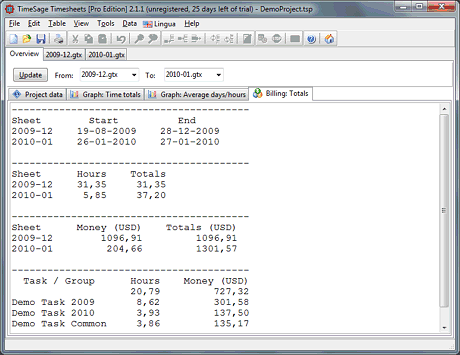
- Free: Statistics and billing information available as graphs and exportable reports.
- Free: Billing includes sums across selected timesheets broken down by task and group.
- Free: Keyboard hotkey combination (default SHIFT+CTRL+T) to bring up timesheets window or menu.
- Free: Configure salary calculations in project options and have timesheets automatically updated.
- Free: Export timesheets to XML, HTML and CSV files (comma, tab and semicolon) for Excel, Calc etc.
- Free: Control import/export using the visibility and ordering configuration of data columns in timesheets.
- Pro: Create project links: Share timesheets and notes across LAN for teams of people.
- Pro: Create unlimited numbers of timesheets and notes instead of max one timesheet per project.
When editing time entries directly, you will never need to hassle with dialog boxes as all data can be entered directly into the timesheets. You can also wave goodbye to unnecessary scrolling as the timesheet columns and rows automatically resize to best fit all data into visible area.
Just by configuring a single option, you can run timesheets software in portable mode from USB sticks. And remember, no matter if you choose free or professional edition, there is no monthly recurring fee like many webbased time tracking solutions that also require internet access.
Get TimeSage Timesheets
You can purchase
TimeSage Timesheets now through a variety of payment methods. We have a 30 days satisfaction guarantee to make your purchase risk-free.
If you want to try our software first, it is now possible to download a fully functional free 30 days trial of the our timesheets software.
Note: When the trial expires TimeSage TimeSheets will switch to its free mode which contains the same features as the old freeware version.
If you have questions or feature requests for any edition of our timesheets software, please write us.
If you want to try our software first, it is now possible to download a fully functional free 30 days trial of the our timesheets software.
Note: When the trial expires TimeSage TimeSheets will switch to its free mode which contains the same features as the old freeware version.
If you have questions or feature requests for any edition of our timesheets software, please write us.


