|
|


Create HTML Sitemaps - HTML Sitemap Tutorial
Tutorial about creating HTML Sitemaps. Learn how to create a HTML sitemap for your website.
Note: We have a video tutorial:

HTML Sitemap Information
This tutorial and its examples assume you are using
A1 Sitemap Generator for creating HTML sitemaps.
While our sitemapper software has many options for configuring HTML sitemaps, we will be using the default settings.
If you already know how to create standard HTML sitemaps, and instead are looking for a complete overview of all the HTML sitemap tools and options available, you should check our help page about advanced HTML sitemaps.
While our sitemapper software has many options for configuring HTML sitemaps, we will be using the default settings.
If you already know how to create standard HTML sitemaps, and instead are looking for a complete overview of all the HTML sitemap tools and options available, you should check our help page about advanced HTML sitemaps.
Benefits HTML Sitemaps
Reduce Bounces and Improve Conversions
If a visitor finds your website through a search engine, it is important he/she quickly can find the relevant content. However, if they can not, some will instead of leaving check to see if your website provides a sitemap.
Search Engine Optimization and Internal Linking
Using a HTML sitemap can help rank your new and important pages since you can include a link to them with relevant anchor text - both things are taken into account by most search engines.
Find All Pages by Crawling Your Website
Before creating your HTML sitemap, you must first crawl your website to find all pages.

After The Website Scan
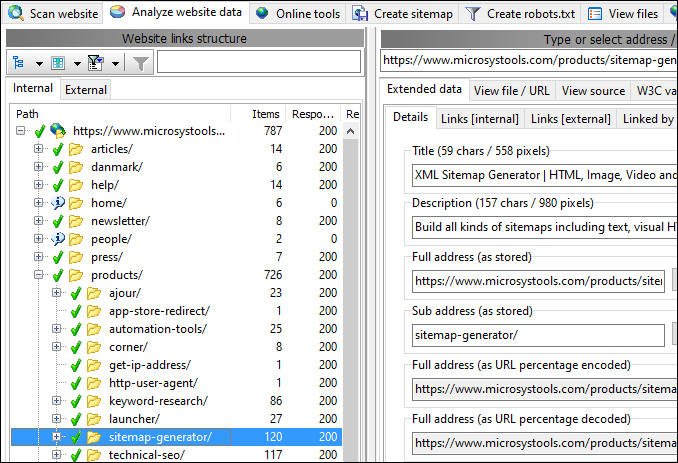
When the website crawl is done, you are shown all the found pages.
For each page, you can view details such as incoming and outgoing links, validate your website for HTML and CSS errors etc.
After viewing the website scan results, press the Create sitemap tab.
You can find even more website and link checker tools in A1 Website Analyzer.
You can find even more website and link checker tools in A1 Website Analyzer.
Create The HTML Sitemap
After choosing HTML template sitemap click Build selected.
When using the default configuration, this will create a HTML sitemap which can validate against HTML/CSS error checkers.
However, it is possible to completely customize the template used, e.g. to create XHTML or HTML sitemaps using your website layout.
Note: If your website uses a server-side language such as PHP or ASP, you can still create HTML sitemaps using the template system. The important thing is not the language used at server-side, but instead what gets outputted to internet browsers and search engine crawlers, i.e. in this case HTML.

Note: If your website uses a server-side language such as PHP or ASP, you can still create HTML sitemaps using the template system. The important thing is not the language used at server-side, but instead what gets outputted to internet browsers and search engine crawlers, i.e. in this case HTML.
View The Created HTML Sitemap
After creating the HTML sitemap you are shown the output, most often HTML source, but it depends on the template used.
You can also view the created HTML sitemap files in various internet browsers.

Getting Your HTML Sitemap Found
All you need now is to:
- Upload HTML sitemap.
- Link to your HTML sitemap from prominent places in your website. This helps:
- Human visitors to navigate your website.
Website pages get some link juice and getting found + indexed by search engines.
Creating Advanced HTML Sitemaps
If you want details on how A1 Sitemap Generator can help you create HTML sitemaps optimized for website visitors including search engines,
you should check the follow-up article about
advanced HTML sitemaps.
Read about splitting HTML sitemaps into multiple pages, making sure all links have relevant anchor text, configuring look and feel of created HTML sitemaps
and how to ensure search engines rank and index more pages.


