|
|


Sitemap Generator for Login Password Protected Pages
Scan and crawl website with sitemap generator, even if the website requires login username and password.
Login Support for HTTPS Websites
If your website uses HTTPS, you may need to configure A1 Sitemap Generator for this.
For more information, see this help page about https.
For more information, see this help page about https.
Always Configure First: URL Exclude Filters
Important:
If you perform a user login, it is very important to
make sure and verify yourself that
the crawler does not follow links that can delete or alter content.
You can do this two ways:
Note It is also important to avoid the crawler follows a logout link since the crawler otherwise will log out by itself.
You can control which URLs A1 Sitemap Generator fetch during the website crawl by excluding them in analysis filters and output filters.
Be sure to test that your filters are configured correctly and work as intended. Do also note we can not take responsibility if something goes wrong - either with the configuration or in the software.
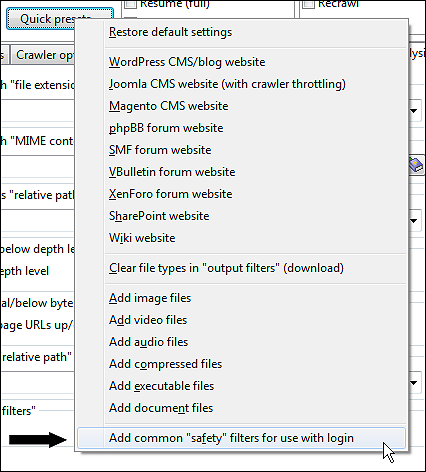
Note: There is a preset available in Scan website | Quick presets... that can help exclude some common patterns of unwanted URLs:
You can do this two ways:
- Have a user account that can not edit or delete any content or settings. (Safest.)
- Limit the crawler to not follow any unwanted links. (Unsafe.)
Note It is also important to avoid the crawler follows a logout link since the crawler otherwise will log out by itself.
You can control which URLs A1 Sitemap Generator fetch during the website crawl by excluding them in analysis filters and output filters.
Be sure to test that your filters are configured correctly and work as intended. Do also note we can not take responsibility if something goes wrong - either with the configuration or in the software.
Note: There is a preset available in Scan website | Quick presets... that can help exclude some common patterns of unwanted URLs:
Website Login Method: Using Embedded Browser for Session Cookies
This is the easiest login method to use since it requires the least configuration.
On Windows: In Scan website | Crawler engine select HTTP using Windows API. or HTTP using Windows API + embeddable system browser.
On macOS: In Scan website | Crawler engine select HTTP using Mac OS API or HTTP using Mac OS API + embeddable system browser.
Each time you want to initiate the website scan, do the following:

This combination will ensure that A1 Sitemap Generator has access to all cookies transferred during the login. You can now start the website scan.
Note if you did not use the normal installer: When using Internet Explorer in embedded mode, it will by Microsoft design default to behave as an older version. This can cause problems with a few websites. For more info see this blog post at MSDN.
On Windows: In Scan website | Crawler engine select HTTP using Windows API. or HTTP using Windows API + embeddable system browser.
On macOS: In Scan website | Crawler engine select HTTP using Mac OS API or HTTP using Mac OS API + embeddable system browser.
Each time you want to initiate the website scan, do the following:
- Consider: Change General options and tools | Internet crawler | User agent ID to a recent Edge or Safari system browser user agent ID.
- Fill Scan website | Paths | Website domain address first as it makes the next step easier.
- In Scan website | Crawler login click the button Open embedded browser and login before crawl.
- Depending on the program version: Click the button Copy session cookies if available.
- Navigate to the login section of the website and login like you normally would.
- You can now close the embedded browser window.
This combination will ensure that A1 Sitemap Generator has access to all cookies transferred during the login. You can now start the website scan.
Note if you did not use the normal installer: When using Internet Explorer in embedded mode, it will by Microsoft design default to behave as an older version. This can cause problems with a few websites. For more info see this blog post at MSDN.
Website Login Method: Protocol Based Login and Authentication Methods
There are some other popular login mechanisms which uses established protocols instead of letting the website handle it.
These are called NTLM, SSPI, Digest and Basic Realm Authentication.
While support for some of these login methods are still work-in-progress, they can sometimes be used for website login.
You can recognize websites that use this though login dialogs like this:
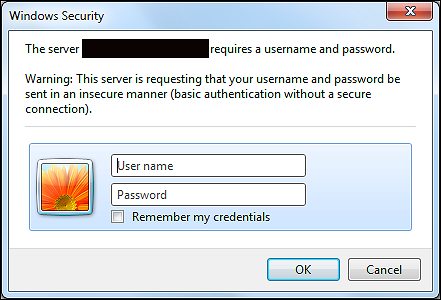
It is very easy to configure the crawler in our sitemap generator software for this login method Scan website | Crawler login:

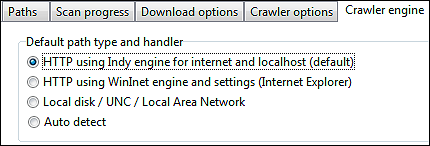
To use the above you will typically use the HTTP using Indy engine for internet and localhost option in Scan website | Crawler engine | Default path type and handler, but if that fails you can also try the HTTP using Windows API option and login with the embedded browser first before starting the website crawl.
You can recognize websites that use this though login dialogs like this:
It is very easy to configure the crawler in our sitemap generator software for this login method Scan website | Crawler login:
To use the above you will typically use the HTTP using Indy engine for internet and localhost option in Scan website | Crawler engine | Default path type and handler, but if that fails you can also try the HTTP using Windows API option and login with the embedded browser first before starting the website crawl.
Website Login Method: Post Form / Session Cookies
Historically, POST form login has been tested most with the HTTP using Indy engine for internet and localhost option in
Scan website | Crawler engine | Default path type and handler.
To use this solution, you will need to understand what data is passed when you login to a website, so you can configure A1 Sitemap Generator to send the same. You can use a FireFox plugin called Live HTTP Headers to see the headers transferred during the login process:
Get FireFox Live HTTP Headers plugin:

Having done that, you just copy-and-paste the appropriate values into the A1 Sitemap Generator login configuration:

If you are looking for an alternative to FireFox Live HTTP Headers you can check out Fiddler (for Internet Explorer) and WireShark (general tool).
To use this solution, you will need to understand what data is passed when you login to a website, so you can configure A1 Sitemap Generator to send the same. You can use a FireFox plugin called Live HTTP Headers to see the headers transferred during the login process:
Get FireFox Live HTTP Headers plugin:
- Clear all HTTP headers already collected.
- Try make a website login in FireFox browser.
- Now focus on the logged HTTP header data from the first entry / page.
- Notice the website address FireFox connects to.
- Notice the content (POST data query string) it sends.
- Use this data to configure headers to send.
Having done that, you just copy-and-paste the appropriate values into the A1 Sitemap Generator login configuration:
If you are looking for an alternative to FireFox Live HTTP Headers you can check out Fiddler (for Internet Explorer) and WireShark (general tool).
Website Login - Post Form / Session Cookies: Details and Demo Project
We have created a demo project that test crawler login support for websites that use session cookies.
Session cookies is the most commonly used method for website login systems. Most of these website logins use POST method for transferring login and user data. It is what PHP defaults to when using start_session.
You can online test or download zipped demo website with login support. For immediate testing, download the zipped demo project file as well.
The username and password required to login successfully is highlighted on the login page.
Session cookies is the most commonly used method for website login systems. Most of these website logins use POST method for transferring login and user data. It is what PHP defaults to when using start_session.
You can online test or download zipped demo website with login support. For immediate testing, download the zipped demo project file as well.
The username and password required to login successfully is highlighted on the login page.
- First test manually that login support works:

Notice how all pages after login all state user is logged in.
- We configure the website crawl root directory:

This is done in Scan website | Paths.
-
We check the source of the login page:

- You can View source in e.g. FireFox.
- Search for <form> and <input> tags related to website login.
- If the URL in <form> tag action attribute is empty, it means the action destination URL is the same as the login page URL.
- The name attribute in the <input> tags vary from website to website.
-
We configure the login options:
This is done in Scan website | Crawler identification.
-
We need to filter out all URLs that will cause website logout during crawl:

This is done in Scan website | Analysis filters and Scan website | Output filters.
-
Start website scan. An easy way to test and verify login works is by using
A1 Website Download.
Just view the downloaded pages: They should all state logged in.
Website Login - Post Form / Session Cookies: Known Problems and Issues
Login systems and concepts known to cause problems:
Above makes it almost impossible to get sitemap generator login working correctly unless you have direct access to the website and know the intrinsics very well.
Known systems to cause problems:
- Upon first login a unique calculated value is passed in the login form: Example could be Javascript code that based on e.g. exact time, IP address, browser user agent ID etc. calculates a value (e.g. a hash or similar) passed in login form. The server knows the algorithm with which the value was generated and validates it server-side.
Above makes it almost impossible to get sitemap generator login working correctly unless you have direct access to the website and know the intrinsics very well.
Known systems to cause problems:
- Some ASP.Net login forms
You can identify ASP.Net login forms by search the HTML output for the string: name="__VIEWSTATE".
Pure speculation and work in progress:
Possibly "viewstate" becomes incorrect even when copying the entire POST/data/headers transferred during manual login (and copied using e.g. FireFox Live HTTP Headers). A possible explanation is that "viewstate" contains a "hash" like verification value much like explained above about problematic login systems.
Alternative for Crawling Login Based Websites
If you own the website, you can code it in a way that gives full access to crawlers with specific
user agent strings.
You can configure this in General options and tools | Internet crawler | User agent ID:

You can configure this in General options and tools | Internet crawler | User agent ID:
XML Sitemaps and Password Protected Pages
Restricting access to parts of your website can often have benefits. However, one downside is that it complicates e.g. creating sitemaps
for your registered users with access to all parts of your website. This guide has shown how to solve this with A1 Sitemap Generator.
However, if you are trying to create XML sitemaps to attract Google and other search engines, you will still need to give these search engines access to you password protected pages.
Study these resources for possible solutions:
However, if you are trying to create XML sitemaps to attract Google and other search engines, you will still need to give these search engines access to you password protected pages.
Study these resources for possible solutions:
- Google Webmaster Central Blog: First Click Free for Web Search
- Google FAQ: Technical Requirements: Registration/subscription sites


