|
|


Errors and Server HTTP Response Header Codes
Complete list of server HTTP response codes and related errors sitemap generator program can recognize.
HTTP Response Codes Server Can Send in HTTP Headers
You can view the HTTP response and program codes for URLs after the website scan has finished:
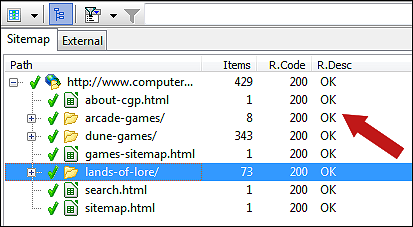
For a full list of possible codes and their explanations, see the table below:
The usage of some of the program specific codes is controlled by the option: Scan website | Crawler options | Use special "response" codes for when page URLs use canonical or similar.
For a full list of possible codes and their explanations, see the table below:
| Code | Description | More Info |
| HTTP Response Codes | ||
| 100 | Continue | |
| 101 | Switching Protocols | |
| 200 | OK | |
| 201 | Created | |
| 202 | Accepted | |
| 203 | Non-Authoritative Information | |
| 204 | No Content | |
| 205 | Reset Content | |
| 206 | Partial Content | |
| 300 | Multiple Choices | |
| 301 | Moved Permanently | The URL redirects to another. To find out where you linked/used/etc. this URL, see internal linking. |
| 302 | Moved Temporarily (Found) | |
| 303 | See Other | |
| 304 | Not Modified | |
| 305 | Use Proxy | |
| 306 | Switch Proxy | |
| 307 | Temporary Redirect | |
| 400 | Bad Request | See rcTimeoutConnect: Timeout: Generic for possible cause and solution. |
| 401 | Unauthorized | Website may require login or similar. |
| 402 | Payment Required | |
| 403 | Forbidden | See rcTimeoutConnect: Timeout: Generic for possible cause and solution.
Possibly a server module denying unknown crawlers access. See help on problematic websites. |
| 404 | Not Found | The URL does not exist. To find out where you linked/used/etc. this URL, see internal linking. |
| 405 | Method Not Allowed | |
| 406 | Not Acceptable | |
| 407 | Proxy Authentication Required | |
| 408 | Request Timeout | |
| 409 | Conflict | |
| 410 | Gone | |
| 411 | Length Required | |
| 412 | Precondition Failed | |
| 413 | Request Entity Too Large | |
| 414 | Request-URI Too Long | |
| 415 | Unsupported Media Type | |
| 416 | Requested Range Not Satisfiable | |
| 417 | Expectation Failed | |
| 500 | Internal Server Error | See rcTimeoutConnect: Timeout: Generic for possible cause and solution. |
| 503 | Service Temporarily Unavailable | See rcTimeoutConnect: Timeout: Generic for possible cause and solution. |
| 504 | Gateway Timeout | |
| 505 | HTTP Version Not Supported | |
| A1 Sitemap Generator Response Codes | ||
| 0 | rcVirtualItem: Virtual Item |
No request has been done by the crawler for this URL.
Happens in cases where a directory example/ is not used, linked or redirected from anywhere (and thus with default settings not crawled), but has URLs underneath that are, e.g. example/file.html. If there are no URLs underneath like described above - rcVirtualItem URLs will not appear in Analyze website data. Alternatively, you can force the crawler to handle such URLs by checking option: Scan website | Crawler options | Always scan directories that contain linked URLs. For more details, see the internal linking help page. |
| -1 | rcNoRequest: No Request |
No request has been done by the crawler for this URL.
You will usually only see this under the following conditions:
|
| -2 | rcUnknownResult: Unknown Result | Server responded with an unrecognized response code. |
| -3 | rcTimeoutGeneric: Timeout: Generic |
Possible solutions if you have overloaded your server:
|
| -4 | rcCommError: Communication Error |
Possible reasons:
|
| -5 | rcTimeoutConnect: Timeout: Connect | See rcTimeoutConnect: Timeout: Generic |
| -6 | rcTimeoutRead: Timeout: Read | See rcTimeoutConnect: Timeout: Generic |
| -7 | rcCommErrorDecompress: Communication Error: Decompress | |
| -8 | rcRedirectCanonical: Redirect: Canonical | Canonical URLs |
| -9 | rcRedirectIndexFileDirRoot: Redirect: Index File Directory Root | Duplicate URLs |
| -10 | rcCommErrorSocket: Communication Error: Sockets |
Possible reasons:
|
| -11 | rcMetaRefreshRedirect: Meta Refresh Redirect | Duplicate URLs |
| -12 | rcCommErrorChunkedWrong: Communication Error: Chunked Wrong | |
| -13 | rcAjaxSnapshotRedirect: Redirect: Ajax Snapshot Redirect |
Google proposed AJAX snapshot solution where
example.com/ajax.html#!key=value
corresponds to
example.com/ajax.html?_escaped_fragment_=key=value
AJAX is a Javascript/browser technology that allows Javascript to communicate directly with a server through HTTP. This allows JS to update the browser content without any page reloads. |
| -14 | rcRedirectNoSlashDirRoot: Redirect: No Slash Directory Root | Duplicate URLs |
The usage of some of the program specific codes is controlled by the option: Scan website | Crawler options | Use special "response" codes for when page URLs use canonical or similar.
Graphics in Website Analysis
After a website scan has finished, you can see all URLs found in the
analyze website tab.
You can see the state of the URLs by their icons:
For details about an URL, just view the R.Code (response code) column value.
You can see the state of the URLs by their icons:
 : Server response 200 - OK.
 : Server error response code, e.g. 404 - Not Found.
 : Server HTTP response code never checked or unknown.
For details about an URL, just view the R.Code (response code) column value.
Error Response Codes for URLs in XML Sitemaps
URLs with error response codes or similar are in default configuration not included in generated sitemaps.
However, you can instruct the sitemap builder in A1 Sitemap Generator to include URLs with error response codes. Simply add all desired response codes to the list in Create sitemap | Document options.

Allowing URLs with error response codes in XML sitemaps is not recommended.
However, you can instruct the sitemap builder in A1 Sitemap Generator to include URLs with error response codes. Simply add all desired response codes to the list in Create sitemap | Document options.
Allowing URLs with error response codes in XML sitemaps is not recommended.
Handling Soft 404 Errors
The term Soft 404 errors is a situation where
a website should return response code 404 : Not Found
for an URL, but instead returns 200 : Found.
Incase you have such URLs, and you do not want them in your generated sitemaps, you can scan your website in A1 Website Analyzer. By using its custom search feature, you can search for text and code specific to pages showing a soft error. After scan, just remove the unwanted URLs, save the project, close A1 Website Analyzer, and load the project in A1 Sitemap Generator before generating the sitemap files.
Incase you have such URLs, and you do not want them in your generated sitemaps, you can scan your website in A1 Website Analyzer. By using its custom search feature, you can search for text and code specific to pages showing a soft error. After scan, just remove the unwanted URLs, save the project, close A1 Website Analyzer, and load the project in A1 Sitemap Generator before generating the sitemap files.
Solutions to Various Types of Server and Crawler Errors
When scanning a complete website, some URLs may result in a standard HTTP error response code,
and other URLs may simply error in different manner, e.g. through connect or read timeouts.
Some common examples are:
To solve more kinds of issues including server error HTTP response codes see:
Some common examples are:
-
500 : Internal Server Error,
503 : Service Temporarily Unavailable and
-4 : CommError:
These are reported when a complete connection failure happens. These can e.g. be caused by firewall issues. -
404 : Not Found:
To solve broken links, read the help page about internal linking.
To solve more kinds of issues including server error HTTP response codes see:
- How to use resume scan to re-check / re-crawl URLs that errored during the first site crawl.
- All about how to ensure all links are found and solve all errors when crawling websites.
- How to adjust speed and resource usage when crawling large websites.
- Guides on how to solve problematic websites and website platforms.


