|
|


Languages, Fonts, Unicode and Code Pages
A1 Sitemap Generator and information about fonts, code pages, character sets and Unicode including e.g. UTF-8
Windows System Font and Unicode Presentation
To correctly view all Unicode characters in Windows XP and below you may have to either:
You may also need to make sure you have all the necessary Unicode fonts and parts installed:
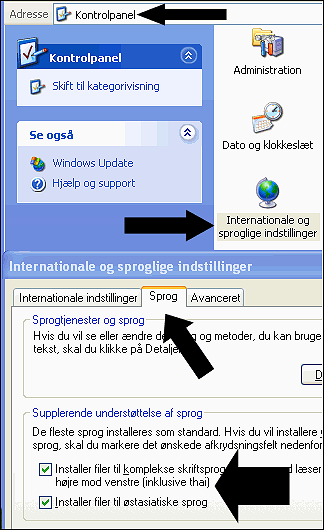
- Change Windows system font into a full Unicode Font.
-
In file muc.ini
(located in the program installation directory) at key FontOverride you can control which fonts A1 Sitemap Generator will attempt to use:
[Misc]
DataAccess=auto
FontOverride=Arial Unicode MS, Lucida Sans Unicode, Segoe UI
You can experiment with the fonts in different order to find the font you like the best.
You may also need to make sure you have all the necessary Unicode fonts and parts installed:
The Following Help Is Primarily Relevant for Old A1 Sitemap Generator Versions
Most of the help page content below was written in 2007 and is mainly relevant to old versions of A1 Sitemap Generator
During 2010 with the release of version of the A1 tools version 3.x, complete internal support of Unicode in our sitemap generator software was completed. With Unicode support fully implemented, you will normally no longer need to configure Windows beyond the above.
Note: However, the following things still hold true for 2015 version 7.x and possibly future versions as well:
During 2010 with the release of version of the A1 tools version 3.x, complete internal support of Unicode in our sitemap generator software was completed. With Unicode support fully implemented, you will normally no longer need to configure Windows beyond the above.
Note: However, the following things still hold true for 2015 version 7.x and possibly future versions as well:
-
The following executables are added during the installation on Windows:
- Sitemap_64b_UC.exe / Sitemap_64b_W2K.exe / 64 bit unicode executable for Windows 2000 or newer.
- Sitemap_32b_UC.exe / Sitemap_32b_W2K.exe / 32 bit unicode executable for Windows 2000 or newer.
- Sitemap_32b_CP.exe / Sitemap_32b_W9xNT4.exe / 32 bit codepage executable for Windows 98 / NT4 or newer.
- The most suitable for your computer hardware and system is automatically made the default.
- When installing A1 Sitemap Generator on Windows 95/98/ME/NT4 this results in a non-Unicode executable.
Crawling Non-Western or Far Eastern Language Websites
It is currently possible to scan all single language (and some multi-language) websites. This includes extracting titles, text, etc.
Currently A1 Sitemap Generator does the following when scanning:
If a website uses multiple languages, you can try one of following solutions:
Currently A1 Sitemap Generator does the following when scanning:
- Encounters a website using some character set, usually UTF-8, UTF-16 or ISO 8859-1.
The actual website language used can e.g. be English, German, Arabic, Russian, Chinese or similar. - The website text is converted into the local computer windows configured codepage. This requires:
- The local computer Windows codepage character set contains the language(s) used in the website.
- The website uses either UTF-8, UTF-16 (+ some more) or the same/similar codepage as local computer.
- All string scanning, processing etc. is handled in local codepage, whether single or multibyte encoded character set.
- When creating e.g. UTF-8 XML files, all text in local codepage is correctly converted into UTF-8.
If a website uses multiple languages, you can try one of following solutions:
- Best:
- Find and use a code page that includes support for all languages in the website.
- Alternative:
- Split website scan up in multiple projects, one for each language.
- With each website scan project, make sure to use an appropriate codepage.
Common Codepages and The Languages They Contain
There exist many codepages. Some are language specific. Some encompass more languages, usually related ones, e.g. latin or cyrillic.
- ISO 8859-1: Contains most of western European languages. This (or slightly different) codepage is what most "western" Windows computers default to.
- Code page windows-1252 charset: Very similar to ISO 8859-1.
- ISO 8859-2: Contains many central and eastern European languages.
- Code page windows-1250 charset: Quite similar to ISO 8859-2.
- Code page windows-1251 charset: Contains Cyrillic languages (e.g. Russian) and English.
- KOI-8: Popular Russian codepage. Good for Russian/English documents.
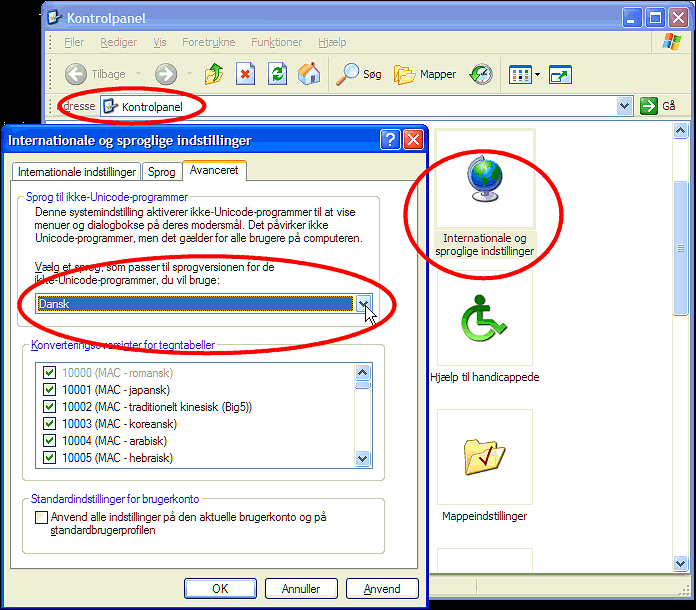
Switch Windows Code Page Language used for Non-Unicode Programs
- Open Control Panel | Regional and Language | Advanced.
- Choose the language you wish to use and click OK.
When A1 Sitemap Generator Will Switch to Unicode UTF-8 or UTF-16 Internally
We currently use Borland/CodeGear Delphi for Windows 32bit native development.
While have a long-term goal of getting our source code to compile with
multiple developer tools and operating system platforms,
Delphi currently remains our primary tool.
The current problem is that Delphi makes it hard to get complete support for Unicode, even when using 3rd party solutions (whereof most only are concerned with user interface controls and not string processing as such). A more serious obstacle is that Unicode solutions implemented in Delphi today risk needing to be replaced and reworked the day Delphi supports Unicode internally in its class libraries and native string data type.
We have written an almost complete file and string abstraction layer that maps and have hundreds of function calls, broad and specialized. All functions currently uses the Delphi native string base type. This layer currently switches some of its mappings depending on what kind of code page character set encoding is used, single byte or DBCS / MBCS.
When Borland/CodeGear has implemented its Unicode solution for native Windows development, most likely based on either UTF-8 or UTF-16, we will expand our string abstraction system to include this and get full internal support for unicode. The steps for this will be:
We have prepared for this in a long time. However, we hope you understand that there is a large amount of work and quality assurance associated with this, and we therefore wait to see the path Borland/CodeGear takes with Delphi before we commit the many man-hours on the final solution.
Currently the roadmap for Delphi has complete Unicode support in Delphi "Tiburon" (codename) which is slated for first half 2008. At some point before this, we will know the details of the path Borland/CodeGear has chosen for implementing Unicode support. This means we can most likely implement final steps of Unicode support sooner than above date.
The current problem is that Delphi makes it hard to get complete support for Unicode, even when using 3rd party solutions (whereof most only are concerned with user interface controls and not string processing as such). A more serious obstacle is that Unicode solutions implemented in Delphi today risk needing to be replaced and reworked the day Delphi supports Unicode internally in its class libraries and native string data type.
We have written an almost complete file and string abstraction layer that maps and have hundreds of function calls, broad and specialized. All functions currently uses the Delphi native string base type. This layer currently switches some of its mappings depending on what kind of code page character set encoding is used, single byte or DBCS / MBCS.
When Borland/CodeGear has implemented its Unicode solution for native Windows development, most likely based on either UTF-8 or UTF-16, we will expand our string abstraction system to include this and get full internal support for unicode. The steps for this will be:
- Some rework and coding of our string abstraction layer. The amount of work will depend on the route Borland/CodeGear chooses, e.g. the need for conversion between Unicode types and the native Delphi "string" data type.
- Expand all string function mappings with Unicode version(s). The point is to avoid converting and rewriting the many thousands and yet thousands of places calling these string functions.
- Even with above, there will be many areas of code that will need to be reviewed and changed slightly.
- Quality aussurance which means lots of testing.
We have prepared for this in a long time. However, we hope you understand that there is a large amount of work and quality assurance associated with this, and we therefore wait to see the path Borland/CodeGear takes with Delphi before we commit the many man-hours on the final solution.
Currently the roadmap for Delphi has complete Unicode support in Delphi "Tiburon" (codename) which is slated for first half 2008. At some point before this, we will know the details of the path Borland/CodeGear has chosen for implementing Unicode support. This means we can most likely implement final steps of Unicode support sooner than above date.


