|
|


Sitemap Generator Command Line Automation
Schedule and automate build and upload of website sitemap in A1 Sitemap Generator using the command line interface (CLI)
Command Line Support in A1 Sitemap Generator
You can use a command line interface to automate all the major sitemap generator tools in the program.
This means that you can also use external applications and bat / batch / script files.
This enables you to run our sitemap generator software at regular intervals using e.g. Windows Task Scheduler.
This means that you can also use external applications and bat / batch / script files.
This enables you to run our sitemap generator software at regular intervals using e.g. Windows Task Scheduler.
- Parameters:
- ":%project-path%" : Where %project-path% should contain the active project file path. (Remember the colon before project path.)
- "@override_initfromproject=c:\example\projects\initfrom.ini@" : Overwrite the initial project settings used.
- "@override_rootpath=http://example.com@" : Overwrite website rootpath.
- "-autocreate" : Automatically create project files and related if they do not exist already.
- "-exit" : Exits when done.
- "-hide" : Always invisible and exits when done.
- "-preferieoverwv2" : If you prefer using Internet Explorer engine over WebView2 based on Chromium.
- "-scan" : Runs website scanner.
- "-stop0000" : Stops scan after a number of seconds, e.g. -stop600 stops scan after 10 minutes.
- "-stopurls0000" : Stops scan after a number of URLs has been both found and handled, e.g. -stopurls500.
- "-save" : Saves project.
- "@override_exportpathdir=c:\example\exports\@" : Overwrite general directory path used for e.g. CSV export data files.
- "-exportexternalcsv" : Exports all URLs data listed in "external" tree view into a file called "external.csv" located in project directory.
- "-exportinternalcsv" : Exports all URLs data listed in "internal" tree view into a file called "internal.csv" located in project directory.
- "-exportsitemapcsv" : Exports all URLs data listed in "internal" tree view into a file called "sitemap.csv" located in project directory.
- "@override_sitemapxmlpath=c:\example\sitemap.xml@" : Overwrite where the generated XML sitemap files are stored.
- "-buildxml" : Runs sitemap builder and creates XML sitemap.
- "-buildnewsxml" : Runs sitemap builder and creates XML news sitemap.
- "-buildmobilexml" : Runs sitemap builder and creates XML mobile sitemap.
- "-buildvideoxml" : Runs sitemap builder and creates XML video sitemap.
- "-buildimagexml" : Runs sitemap builder and creates XML image sitemap.
- "-buildcodexml" : Runs sitemap builder and creates XML code sitemap.
- "-buildrss" : Runs sitemap builder and creates RSS sitemap.
- "-buildtext" : Runs sitemap builder and creates text sitemap.
- "-buildtemplate" : Runs sitemap builder and creates template sitemap (usually HTML / XHTML).
- "-buildaspnet" : Runs sitemap builder and creates XML ASP.Net sitemap for use by ASP.Net controls.
- "-buildgraphdatadot" : Build a graph data file using dot / .gv file format which can visualized in other tools including GraphViz.
- "-build" : Runs sitemap builder and creates a sitemap of the selected type in project settings.
- "-buildall" : Runs sitemap builder for all kinds.
- "-robotstxt" : Creates a "robots.txt" file.
- "-upload" : Runs sitemap uploader and FTP uploads the last generated sitemap.
- "-uploadall" : Runs sitemap uploader and FTP uploads all generated sitemaps.
- "-ping" : Performs sitemap ping notification.
- Examples for usage on Windows:
- [ "c:\microsys\sitemap\Sitemap.exe" -exit -scan -build -upload -save ":c:\microsys\sitemap\projects\my-project.ini" ].
- [ "Sitemap.exe" -exit -scan -build -upload -save ":my-project.ini" ] - Here it is assumed my-project.ini is in the same directory as the executable.
- [ "Sitemap.exe" -scan -build @override_rootpath=http://example.com@ ]
-
[ start "" "Sitemap.exe" -scan -build @override_rootpath=http://example.com@ ] - Launches asynchronously. Do not use spaces in parameters.
[ timeout 2 ] - Idle time to avoid problems with multiple instances launching at the exact same time.
- Examples for usage on Mac OS:
- [ open -n A1SitemapGenerator.app --args -scan -build @override_rootpath=http://example.com@ ].
- [ open -n A1SitemapGenerator.app --args -exit -scan -build -save -autocreate ":/users/%name%/myprojects/shopexample.ini" @override_initfromproject=/users/%name%/myprojecs/mydefaults.ini@ @override_rootpath=https://shop.example.com@ ].
- Tips:
- To prevent a parameter value that contains spaces (e.g. if you are passing a directory path) from being broken up, enclose it inside a couple of "".
- In the above examples
%name%refers to your user name in the given operating system.
Automate Sitemap Generator with Command Line and Batch Files
- Create a batch file using any standard text editor:
- Windows: batch-file.bat
- Mac: batch-file.command
- Example of what to write underlined:
- Windows: [ "c:\microsys\sitemap\Sitemap.exe" -exit -scan -build -upload -save ":c:\microsys\sitemap\projects\my-project.ini" ].
- Mac: [ open -n A1SitemapGenerator.app --args -scan -build @override_rootpath=http://example.com@ ].
- Save your batch file. You can now call it yourself or from other programs and scripts.
- Download this ZIP file containing the demo project including ".bat" file (for Windows) to get you started.
Schedule and automate Sitemap Generator with Windows Task Scheduler
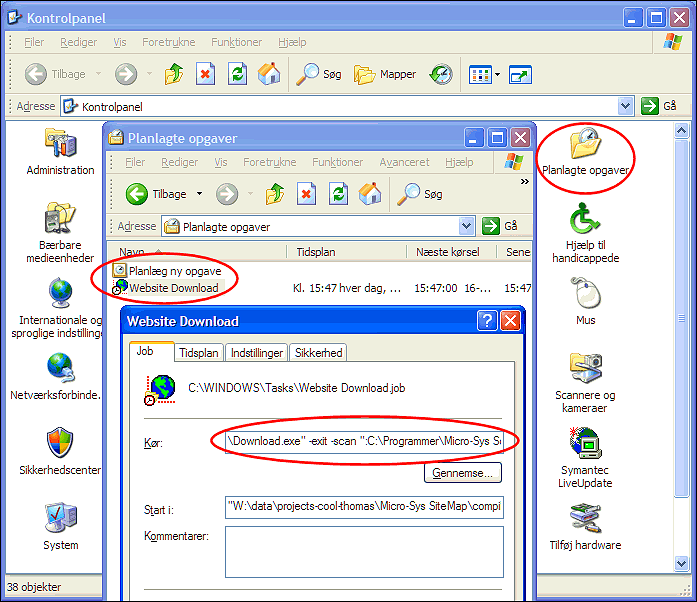
- Open Control Panel | Scheduled Tasks | Add Scheduled Task. Follow the guide.
- Open the generated sitemap generator time scheduled item to edit details, e.g. command line parameters.


