|
|


Website Analyzer Crawl Does Not Find All URLs
What to do if you only see few links after website crawl by website analyzer program.
When Website Analyzer Program Finds Too Few or Odd Page URLs
First read how
A1 Website Analyzer
helps find
website linking
problems. Then go through this check list:
-
Using a
firewall
program? You need to configure it if website scan returns few URLs,
and they all have response code -4 : CommError.
-
Are you mixing www and non-www usage in website links and redirects? Check the externals tab to know.
-
Does your website use website cloaking, i.e. change content depending on the user agent string used by crawler?
Then change the user agent string used by the crawler to identify itself:
General options and tools | Internet crawler | User agent ID.
-
Does your website and/or pages in it redirect to or get content from another domain?
(e.g. through <frame> or <iframe>)
Check the externals tab to know.
-
Is an entire section of pages hidden and not linked at all from the other parts of the website? In this case, having cross-linked all hidden pages is no help!
To solve this, you can use multiple
start search paths.
-
Does the website rely on Javascript or uncommon types of HTML link tags for website navigation, e.g. <iframe>, <form> and <button>?
Solution: Enable checking these things for links in Scan website | Crawler options.
-
Does the website use // instead of / in links?
And does the webserver not respond with an error or redirect in such cases?
And does the problem cascade if the page URL is linked using relative paths?
Solution: Configure Scan website | Crawler options to handle this situation.
-
Does the website have a dynamic page that generates unique links based on input from GET ? data? This can sometimes cause an endless loop of unique URLs!
-
Various exclude filters in program configuration and website:
- Are you blocking pages with robots.txt or noindex meta tags? Learn more about nofollow, noindex and robots.txt.
- Have you configured analysis to exclude certain URLs and output filters and forgot about them?
Remember: If you exclude some page URLs from analysis, the crawler does not find or follow the links on those pages. If you have URLs that are otherwise not linked from anywhere - those URLs will never be found or analyzed.
You can also configure when URLs excluded by Scan website | Output filters, robots.txt and similar are removed:- Older versions:
- Scan website | Crawler options | Apply "webmaster" and "output" filters after website scan stops
- Newer versions:
- Scan website | Output filters | After website scan stops: Remove URLs excluded
- Scan website | Webmaster filters | After website scan stops: Remove URLs with noindex/disallow
Switching the above off makes it easier to locate possible reasons for missing URLs You can see many details in the Crawler and URL state flags section for each URL. If you still have problems finding out why a page URL is missing try investigate the whole link chain by inspecting the flags for noindex, nofollow, disallow and similar. You may also want to inspect the HTML source to verify links are coded correctly.

-
Are you scanning a website subdirectory which contains no links to pages within that directory? Check externals tab to know.
-
Consider if your website is using non-standard file extensions. If you know which, you can add them:

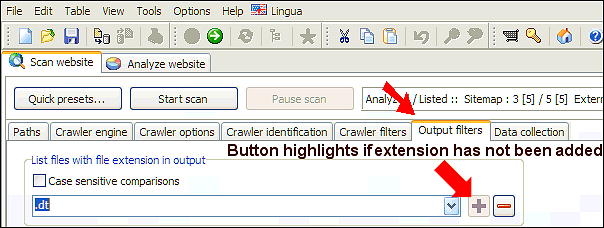
Alternatively, clear all file extensions in analysis and output filters, but keep the default MIME filters both places. Then try scan again.
-
Do you have directories with response code 0 : VirtualItem in scan results?
Check the information about
internal website linking.
-
Are there many URLs with errors in the website scan results?
If the webserver is causing some URLs to give error response codes, e.g. because of server bandwidth throttling,
you can try
resume scan
until all errors are gone. This will most likely lead to more found links and pages.
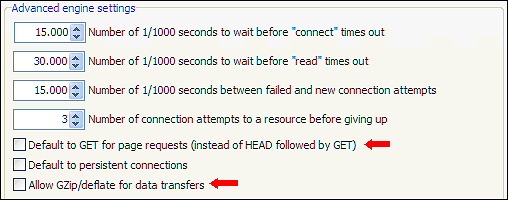
Another solution towards solving URLs with error responses is to experiment with options found in Scan website | Crawler engine | Advanced engine settings. Some common settings which often help: Increasing timeout values, using GET only and enabling/disabling GZip/defalte support.