You can select which language to use in the program user interface through the
Lingua menu.

There may be more sitemap generator
language packs available online.
When you first open the translation window, you will find
that all English language files are always shown and readonly.
This allows for easy
side-by-side translation comparisons.

At this point you can add support for a new language or open an existing.
Notice that language files are placed in the
%application%\trans\ directory and end with
.ini.

Having just started a new language, nothing is translated!
You can use the
refresh / synchronize button to copy the English translation.
If you already have translated some strings, these will be kept. However, some repositioning may occur, so all the
English and your translations are located the same places in their
respective files. This makes it easier to spot missing translations.

Translation is straightforward in most cases. You can encounter 3 types of fields:
- SomeName1__Value=text - everything after the equal sign should be translated
- SomeName2__Value=text {variable} text - do not translate the {variable} part
- SomeName2__Template=__curly - do not translate at all, this tells that everything embedded in curly {...} is a variable
The text portion may sometimes utilize some, on first sight, strange characters:
(use these to create certain effects, e.g. line breaks)
- <NL> - Shows a new line
- < - Shows a < character
- > - Shows a > character
- & - Shows a & character
All translation files have a section called
[MetaData] with following fields:
- Lingua_ID - Set this to your language ID, e.g. en-uk or de
- Author_Name - Set this to your name, i.e. the current / primary translator
- Author_Email - Email address of above translator
- Author_WebUrl - Website address of above translator
- Author_ThanksTo - If more people have helped translating, mention them here
- Author_Comments - Can be anything, e.g. what still needs to be translated
- Document_LastUpdateDate - When was the translation last updated
- Document_LastUpdateProgram - For what program was the translation done
- Document_LastUpdateVersion - For what version was the translation done
Some translation files have fields called
.BiDiMode. Valid values are:
- LeftToRight - Reading order is left to right. Alignment is not changed. The vertical scroll bar appears on the right edge of the control
- RightToLeft - Reading order is right to left. Alignment is changed. The vertical scroll bar appears on the left edge of the control
- RightToLeftNoAlign - Reading order is right to left. Alignment is not changed. The vertical scroll bar appears on the left edge of the control
- RightToLeftReadingOnly - Reading order is right to left. Alignment and scroll bar are not changed
Save files as UTF-8:
- Using built-in translation and localization tool: Everything is handled automatically.
- Using text editors like Notepad++ etc:
- Make the name of translated files start with UTF8_.
- In your favourite text editor, save the files as an UTF-8 encoded document with BOM.
Advantages when using UTF-8:
- A codepage is used to determine the meaning of bytes in a character stream.
- For countries using a Western European language default codepage is Windows-1252 / ISO-8859-1.
- If you view a document that was saved in a different codepage than yours, it can be unreadable.
- This problem is resolved by using UTF-8 since it can encode all characters in all languages.
- UTF-8 is a Unicode standard that is very storage efficient for most languages.
- UTF-8 files are generally readable by all text editors and browsers.
UTF-8 usage in
A1 Sitemap Generator:
- Old versions: UTF-8 translations files are loaded and internally converted into local codepage.
(This means your codepage has to be compatible with the language translated)
- Current versions: UTF-8 translations files are loaded and kept as Unicode.
(Meaning everyone no matter codepage can use the language files)
Computer configuration when translating:
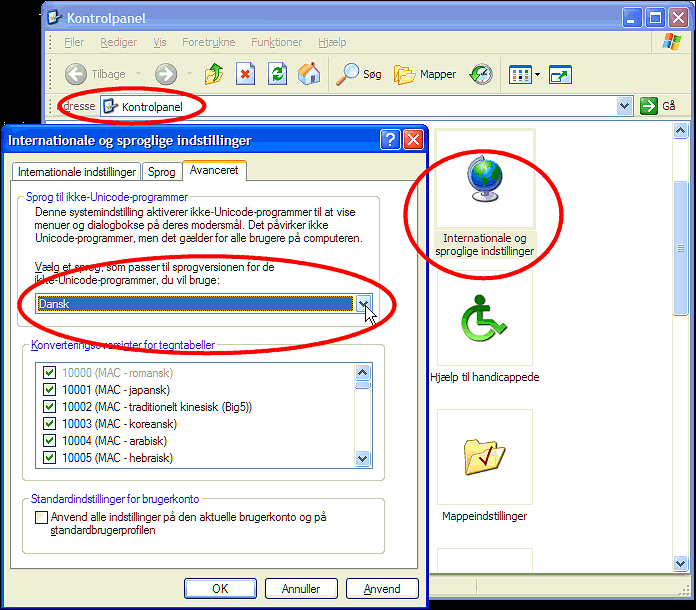
It is best if your Windows codepage language is the same as the language you are translating to:
- Open Control Panel - Regional and Language - Advanced.
- Choose the language you wish to use and click OK.
Translation Guidelines and Tips
- Error and typos in the English translation:
Please report these with the Send feedback function in the Help menu.
- Error and typos in other translations:
Try contact the authors of these. If that fails, see above.
- If you wish to translate the program:
That is great! We will do our best to help you with free licences etc.
(Before you start, be sure to contact us, so your efforts are not duplicated by others)
A1 Sitemap Generator |
help |
previous |
nextBuild all kinds of sitemaps including text, visual HTML / CSS, RSS, XML, image, video, news and mobile for all your websites no matter the platform they use.
This help page is maintained by
Thomas SchulzAs one of the lead developers, his hands have touched most
of the code in the software from Microsys.
If you email
any questions, chances are that he will be the one answering.



